

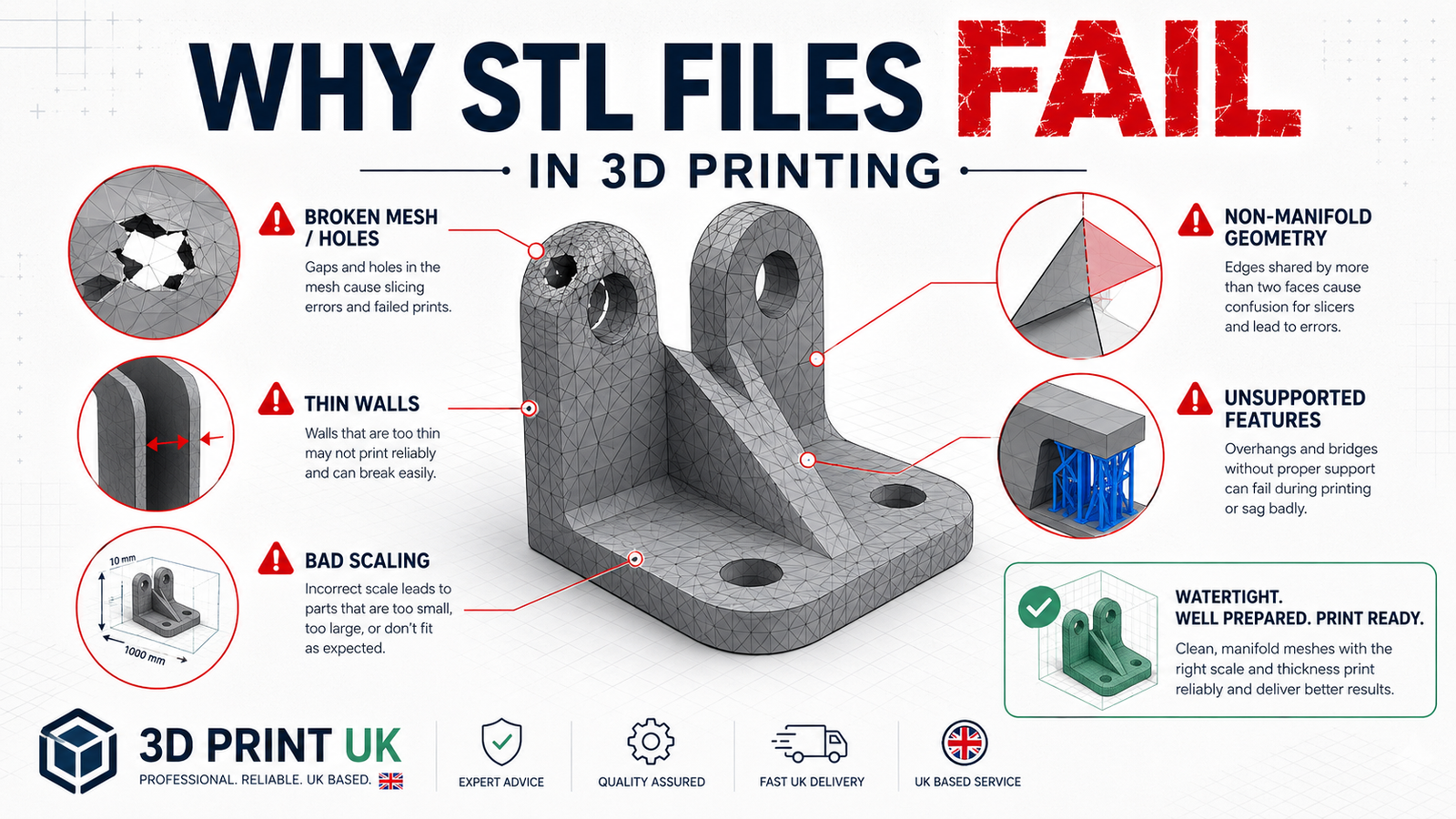
STL files are the most common file format used in 3D printing, but they do not always print successfully. A model can look fine on screen and still fail once it reaches the slicer or printer. In some cases, the file itself is damaged. In others, the design is technically valid but still not practical for real-world printing.
In this guide, we explain why STL files fail in 3D printing, the most common causes of failure, and what you can do to fix the problem before wasting time and material. If you need help checking a file before production, you can use our 3D printing service UK or upload your model directly through our instant quote / upload page.
An STL file fails when it cannot be sliced properly, printed reliably, or produced as a usable physical part. This does not always mean the file is completely broken. Sometimes the mesh is damaged. Sometimes the model is technically valid but badly designed for printing.
An STL file may fail at different stages:
That is why STL failure is not just a file problem. It can also be a geometry, scaling, wall thickness, orientation, or design problem.
There are several common reasons why STL files fail in 3D printing.
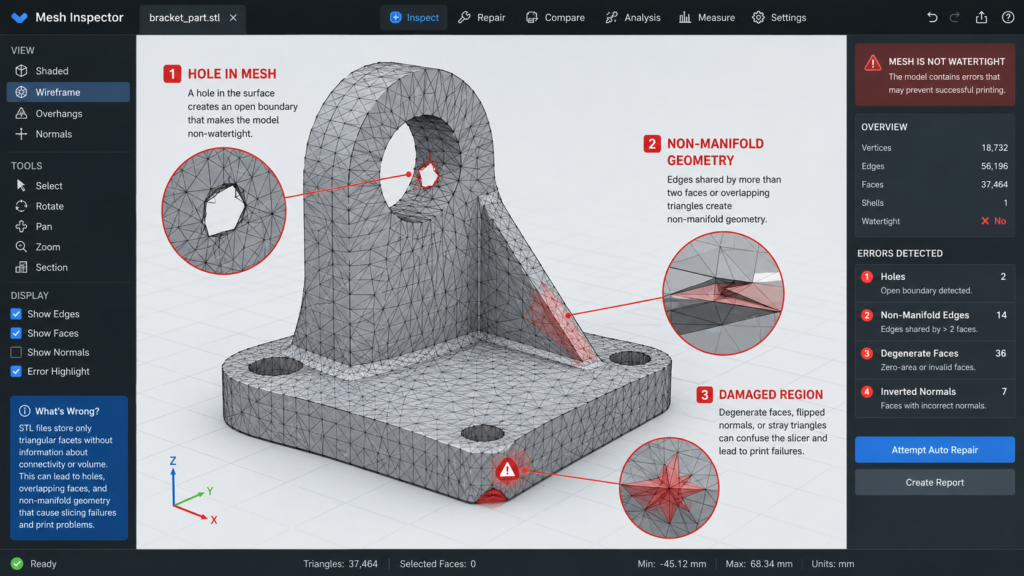
One of the most common problems is broken mesh geometry. This includes:
These issues can confuse the slicer and lead to missing layers, strange toolpaths, or failed imports.
You may also want to read Common STL File Errors and How to Fix Them.
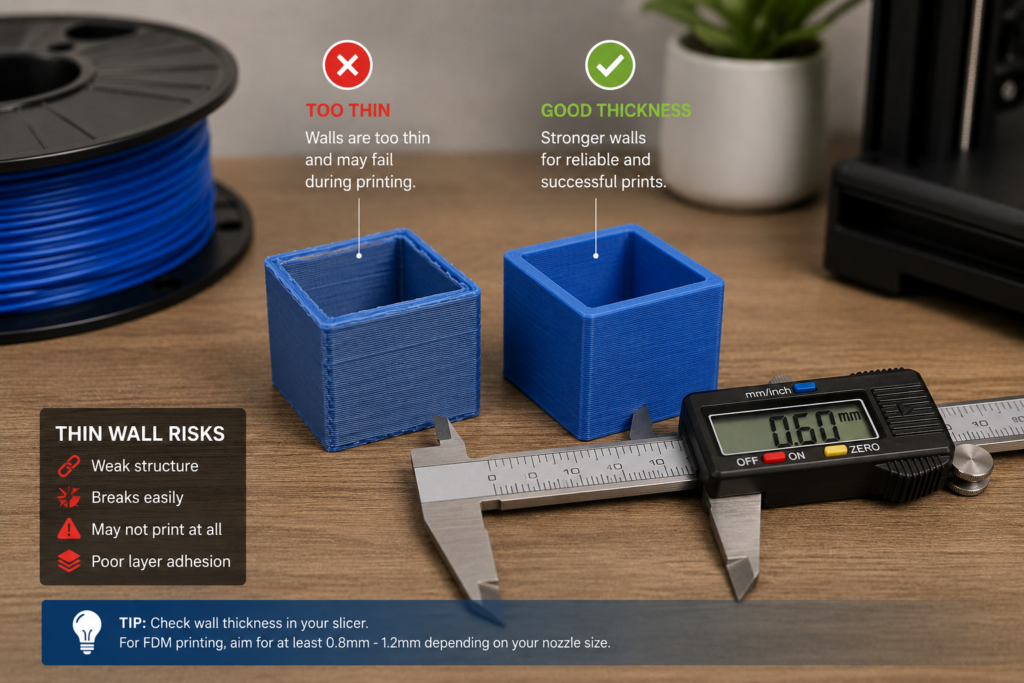
A file can be technically valid and still fail because the part is too thin to print properly. Thin walls may disappear in slicing, print weakly, or break during handling.
This is especially common in:
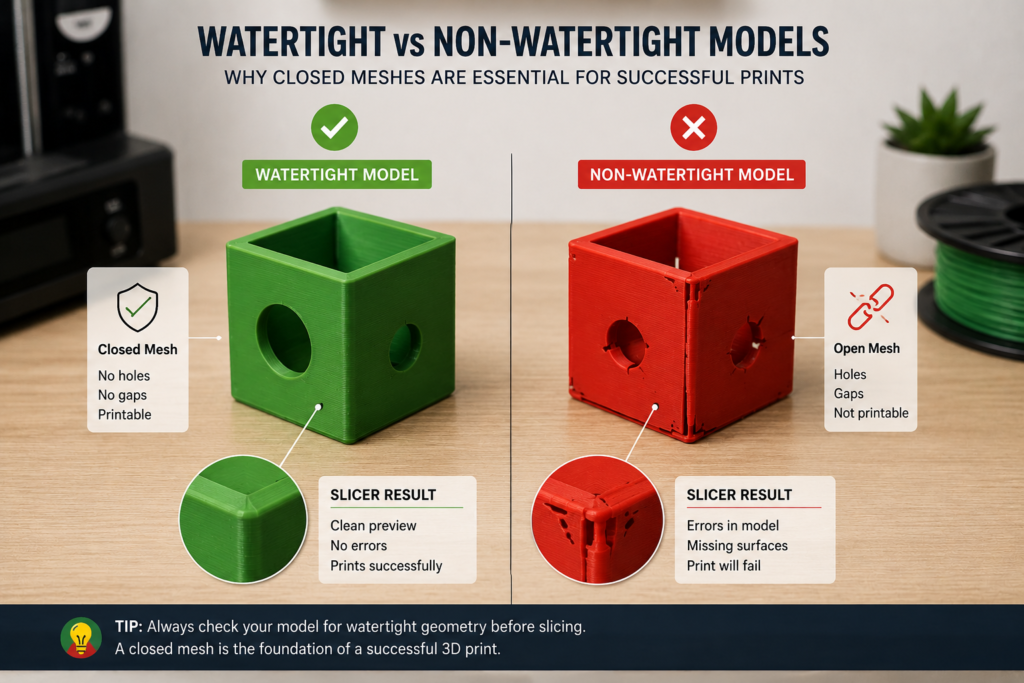
A watertight STL is a model that forms a complete closed volume. If the mesh is open, the software may not understand what is inside and what is outside.
This can cause:
Some STL files include excessive mesh density or unnecessary detail that does not improve the print. A file with millions of triangles may slow down the slicer without giving better real-world results.
Very dense STL files can cause:
You may also want to read What Resolution Should STL Files Be.
The opposite problem also happens. If the STL resolution is too low, curved surfaces become faceted and rough. While this may not always cause a full print failure, it can make the final part look poor or inaccurate.
This is most visible on:
Incorrect scaling is another major reason STL files fail. A model may be too large for the bed, too small to print reliably, or incorrectly resized so that tolerances no longer work.
Scaling problems often lead to:
You may also want to read How to Scale STL Files Correctly.
Some STL files are valid as 3D shapes but still not suitable for printing. A model may include:
This is a design-for-printing problem rather than a pure STL error.
You may also want to read How to Check If a Model Is 3D Printable.
One of the biggest mistakes is assuming that if an STL opens in the slicer, it must be fine.
That is not true.
A file may still have serious problems even if it opens normally, such as:
Opening correctly is only the first step. It does not guarantee successful printing.
Many STL files downloaded from marketplaces, forums, or free model libraries are not ready for real printing. Some were designed for visual use only. Others were exported badly, scaled incorrectly, or never tested on an actual machine.
Common problems with downloaded STL files include:
This is why downloaded files should always be checked before printing.
Not all STL failures happen for the same reason. The type of part matters.
Functional parts are more likely to fail because of:
A functional STL often needs more than just mesh repair. It may need proper CAD adjustment.
Decorative models are more likely to fail because of:
The file may be printable, but only with the right setup and expectations.
Before printing, look for warning signs such as:
If you notice any of these, do not assume the printer will somehow solve it for you. Printers are many things, but miracle workers are not one of them.
The best way to avoid failure is to check the file before printing.
Always open the file in slicer software and inspect:
If the STL has broken surfaces or non-manifold issues, repair it before slicing.
You may also want to read How to Repair Broken STL Files.
Check that the model is the correct real-world size and still printable after any scaling.
Thin walls are one of the most common hidden reasons for print failure. Make sure the part is thick enough for the chosen process.
A part suitable for resin may not be suitable for FDM without changes. The file should be reviewed with the actual print process in mind.
For prototypes, mechanical parts, or assemblies, a small test print can reveal problems before you commit to the final version.
Sometimes, but not always.
Some slicers can repair minor mesh issues automatically. This can help with small holes or surface defects, but it does not solve every problem.
Automatic repair usually does not reliably fix:
In other words, auto-repair is useful, but it is not magic. Humans still have to think occasionally.
Some STL failures cannot be properly fixed in a mesh editor. If the issue is related to geometry logic rather than damaged triangles, the better solution is often to go back to CAD.
This is especially true for:
If the model needs dimensional correction, redesign, or tolerance control, CAD is usually the correct place to fix it.
If your STL file:
then it is worth getting it checked before printing.
At 3DRevolution, we help customers review STL files, identify printability problems, and prepare models for production in the UK. You can upload your file through our instant quote / upload page or learn more about our 3D printing service UK.
STL files fail in 3D printing for many reasons, including broken mesh geometry, thin walls, bad scaling, poor resolution choices, and models that were never properly designed for printing in the first place.
The good news is that most of these problems can be identified before printing if the file is checked carefully. A proper review of geometry, scale, wall thickness, and printability can save time, material, and frustration. If you are not sure whether your STL file is ready, 3DRevolution can help you prepare it for production.